Опасные машины ездят по дорогам!
Злой Дядька в сети — 2017
Умный кот переходит дорогу по правилам
Был бы у меня такой кот, я бы может и не женился. 
Лиса в центре Новой Москвы
Недавно в Троицке (центр Новой Москвы) прямо у подъезда дома была замечена дикая лиса. Скоро, видимо, медведи заведутся.
Ошибка встраивания манифеста в исполняемый файл
В последнее время при сборке Qt-проектов компилятором от Visual Studio стал периодически видеть такую ошибку:
mt.exe : general error c101008d: Failed to write the updated manifest to the resource of file ...
Меня это начало напрягать и я решил разобраться в причине. Оказалось, что директория, в которую компилятором складываются все промежуточные файлы (в том числе и манифест), почему-то имеет атрибут Read Only. После отключения у папки этого атрибута ошибка пропала.
Также, как пишут в интернете, причиной такой ошибки может стать работа антивируса, поэтому его также рекомендуется отключать при появлении такой ошибки.
Как в России перевозят холодильники
Случайно стал свидетелем, методику - одобряю.
Редкие монеты России: 25 рублей, Чемпионат мира по практической стрельбе из карабина

15 мая 2017 года Центральным Банком России выпущена в обращение памятная монета достоинством 25 рублей "Чемпионат мира по практической стрельбе из карабина".
Монета "Карабин", как её окрестили нумизматы, выпущена достаточно малым тиражом - до 150000 экземпляров. Столь малый тираж делает эту монету очевидным кандидатом на то, чтобы стать редкой.
Читать запись целикомСвязка QComboBox и QTreeView
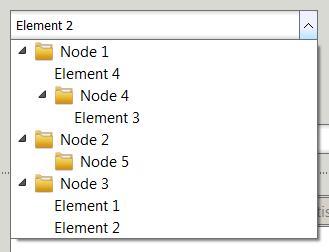
В одном из выпадающих списков (QComboBox) мне потребовалось отобразить некую древовидную структуру элементов. По сути, всё сводится к установке QTreeView в качестве выпадающего списка для QComboBox. Задача тривиальная: создаём модель (я взял стандартную QStandardItemModel), создаём вид (QTreeView), связываем модель с видом и устанавливаем их в качестве модели и вида для нужного экземпляра QComboBox. Тут ничего сложного нет.
Проблемы начались, когда мне потребовалось программно установить текущий элемент в QComboBox. Решение нашлось, хотя и не сразу и не совсем прямое:
/* Определяем индекс в модели, который нужно сделать текущим */
QModelIndex index = findIndex();

/* Устанавливаем текущий элемент у view */
view->setCurrentIndex( index );

/* Устанавливаем текущий элемент в QComboBox */
myComboBox->setRootModelIndex( index.parent() );
myComboBox->setCurrentIndex( index.row() );
myComboBox->setRootModelIndex( QModelIndex() );
Источники данных ODBC для Qt-программ под Windows (64 бит)

Написав программу, взаимодействующую с базой данных посредством источников данных ODBC, я столкнулся с неприятной проблемой: 32-х битные программы, написанные на Qt и запущенные под 64-х битными операционными системами Windows, не видят источников данных, созданных штатным способом, т.е. через диалог, вызванный из панели управления. Решение нашлось на одном из зарубежных программистских форумах. Приведу его тут, чтобы не забыть самому и, быть может, оказаться полезным кому-нибудь ещё. Итак, создайте свои ODBC-источники через следующую программу:
C:/Windows/SysWOW64/odbcad32.exeПосле запуска этой программы на экране вы увидите диалог, абсолютно идентичный классическому диалогу создания ODBC-источников, однако источники, созданные этим способом, будут видны 32-х битным Qt-программам под 64-х битными Windows.
Простая реализация стека на Lua
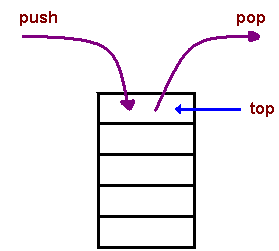
Понадобилось тут для одной из частей проекта, написанной на языке Lua, реализовать простейший стек. Решил оставить в заметках, вдруг кому-то понадобится. Вот, что получилось:
Читать запись целиком